/
Core Usage & Interaction
Structure intuitive navigation so users find what they need in 3 seconds. Clear menus boost discovery, task completion, and retention.
what would you do?
Your SaaS has 15 top-level menu items. Users take 8+ seconds to find key features.
Analytics show visitors spend excessive time scanning the header before clicking anything. 45% bounce without navigating. Your CEO wants to add two more menu items for new features.
A
Add the 2 new items to the menu and make them bold to stand out
B
Reduce to 5-7 core items, group rest under "More" dropdown
C
Keep all 15 items but reorganize them alphabetically
D
Move everything into a hamburger menu to clean up the header
The Problem
Navigation failures kill retention. Baymard's 2025 benchmark found ~60% of desktop and ~67% of mobile sites have mediocre or poor navigation UX [1].
Overly complex menus overwhelm users. Too many links or deep hierarchies confuse visitors. Baymard found users "felt overwhelmed" by menus longer than ~10 items [2]. On mobile especially, long menus cause endless scrolling.
Vague or hidden labels leave users guessing. Generic terms like "Resources" or icons alone mean nothing. Links should include full context, like "Women's New Arrivals" instead of just "New Arrivals" [3].
No context highlighting disorients users. Failing to highlight the current page or section confuses users [4]. Users bounce if they lose track of structure.
Poor mobile adaptation breaks experience. If critical sections are buried or menus are too small on mobile, users get frustrated. Baymard shows mobile nav is often worse than desktop [1].
The Solution
The 3-Second Navigation Clarity Test
On initial page load, users should understand where to click to achieve their goal. All major sections labeled in plain language and visible without hunting.
Example:
Home | Features | Pricing | Docs | Company | Login
In 3 seconds, visitors should spot "Features" for product info or "Pricing" to subscribe. If not, the nav needs work.
Label clarity and scope. Use descriptive labels and include full scope when needed [3]. Instead of "Blog", use "Blog & Guides" if the link goes to help content.
Logical grouping and chunking. Keep top-level menus shallow (ideally 5–7 items). Baymard suggests breaking categories into chunks of ~10 before subdividing [2].
Highlight current context. Always visibly mark which menu item is active [4]. Highlight the "Pricing" tab when on the pricing page.
Responsive and adaptive design. Amazon A/B tested moving its large menu into a hamburger on desktop and saw a lift [5], showing well-designed mobile-style nav can help desktop UI.
Navigation Patterns
Sidebar Navigation with Collapsible Sections
Persistent left sidebar organizes unlimited content without overwhelming [1]

Spotify
How they do it
Spotify solves the "endless library" problem with progressive disclosure. The sidebar reveals complexity only when you need it. Your Library collapses until clicked, then expands into organized tabs. This keeps casual browsers from drowning in options while giving power users instant access to their 500+ playlists. The three-tier hierarchy (global nav → library categories → individual items) mirrors how people actually think about their music.
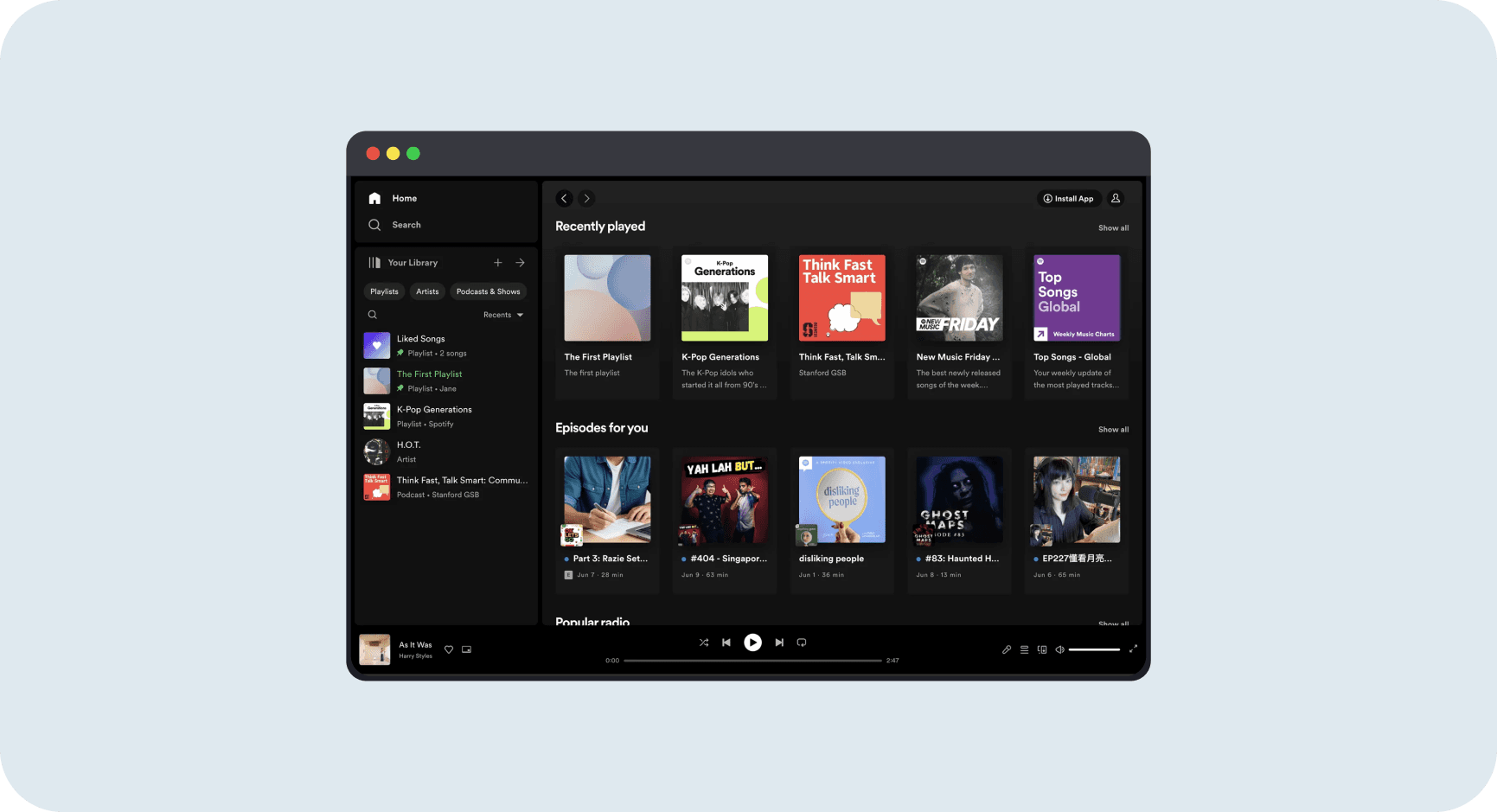
Why it works
The sidebar grows with you without punishing you. Week one with 3 playlists? Clean and simple. Year three with 300 playlists? Still navigable through search and filters. The persistent structure means muscle memory builds over time:Home is always top-left, your content is always in the middle, playback controls always at bottom. This consistency turns navigation into habit. Users stop thinking about "where to click" and start thinking about "what to play."
Bottom Tab Bar Navigation
Primary tasks reachable in one tap on mobile [1]
Left Sidebar with Icon Navigation
Persistent sidebar keeps core actions always accessible [3]
Navigation Types by Product
Different products need different navigation approaches. Match your structure to user expectations and product complexity.
Product Type | Optimal Nav Pattern | Example | Key Metric |
|---|---|---|---|
B2B SaaS | Top menu (5-7 items) + CTA | Slack, Asana | Signup conversion |
E-commerce | Mega menu with categories | Amazon, Shopify | Product discovery |
Mobile Apps | Bottom tab bar (4-5 items) | Instagram, Uber | Feature engagement |
Content Sites | Top menu + prominent search | Medium, NYT | Pages per session |
Dashboards | Sidebar nav with icons+text | Notion, Figma | Task completion |
Mistakes That Kill Success
avoid this
Overloaded Menus
Cramming too many links overwhelms users. Baymard's testing shows users felt "there's a lot of options here" when lists exceeded ~10 items [2].
Fix
Keep top-level menus to 5-7 items maximum. Group secondary functions under "More" or use mega-menus with clear categories. Chunk long lists into manageable groups of ~10 items each.
avoid this
Ambiguous Labels
Non-specific wording causes misclicks. Baymard recommends including full context in link text [3].
Fix
Use "Women's New Arrivals" instead of generic "New Arrivals." Add descriptive labels: "API Docs" not just "Docs", "Billing Settings" not just "Settings". Make every label self-explanatory.
avoid this
Hiding Core Navigation
Putting primary functions behind an icon (especially hamburger on desktop) can reduce usage. If users have to guess where to click, many will miss it.
Fix
Keep essential sections (pricing, login, search) always visible on larger screens. If using a hamburger menu, label it clearly ("Menu" or "All") and make the icon obvious. Test feature discovery before and after.
Metrics That Matter
Discovery Rate
How easily users find pages. Measures whether navigation helps users reach their intended destination.
Formula
Discovery Rate = (users who find X page via nav ÷ total users who sought X) × 100
Benchmark
Good nav yields high discovery rates. Aim for >80% for key pages. Below 60% signals hidden or confusing navigation.
Track menu click CTR: clicks on any nav link ÷ total page views
Segment by new vs returning users to identify onboarding issues
Monitor which menu items are never clicked (candidates for removal)
A/B test menu labels and measure lift in discovery rate
Task Completion Rate
For key tasks (signup, purchase), measure if nav helped. Shows whether navigation supports core user goals.
Time to First Click
Average time until a user first clicks navigation. Shorter means they found the menu quickly.
The Business Impact
67%
Of mobile sites have mediocre or poor navigation UX. Fixing nav is one of the highest-leverage improvements you can make [1].
Increased Conversions
A SaaS site replaced generic "Learn more" with clear "Start Free Trial" menu item, boosting trial signups 15%. Clear navigation channels users toward conversion.
Reduced Support Costs
Adding visible "API Docs" link reduced support tickets by 8% in one engineering org. Clearer menus mean fewer users contacting support to ask "where is X".
Higher Retention
A mobile app that optimized its tab bar icons saw 10% increase in 30-day retention. Users frustrated by navigation are less likely to return. Smooth flows encourage habit formation.
Revenue Growth
A marketplace reorganized its top menu into two levels (primary categories, then subcategories). Reduced search time by 20% and increased add-to-cart rate by 12%. Better nav drives revenue.
Resources Worth Your Time
UX Research & Best Practices
Analytics & Implementation