Onboarding & Activation

First-Time Onboarding Flow

First-Time Onboarding Flow

Design the UI journey from signup to first value. Reduce friction, eliminate blank slates, and guide users to their aha moment in under 5 minutes.

what would you do?

User lands on your dashboard after signup. It's empty. No data, no examples, just blank widgets and a "Get Started" button.

60% close the tab within 30 seconds. Your designer wants to add a product tour. Your PM wants a checklist. Engineering says "users should explore on their own."

What's the highest-impact fix?

A

Add a 5-step product tour explaining each feature

B

Show a checklist: "1) Add data 2) Create report 3) Share with team"

C

Add tooltips explaining what each empty section will do

D

Pre-populate with example data and template so they see value immediately

what would you do?

User lands on your dashboard after signup. It's empty. No data, no examples, just blank widgets and a "Get Started" button.

60% close the tab within 30 seconds. Your designer wants to add a product tour. Your PM wants a checklist. Engineering says "users should explore on their own."

What's the highest-impact fix?

A

Add a 5-step product tour explaining each feature

B

Show a checklist: "1) Add data 2) Create report 3) Share with team"

C

Add tooltips explaining what each empty section will do

D

Pre-populate with example data and template so they see value immediately

what would you do?

User lands on your dashboard after signup. It's empty. No data, no examples, just blank widgets and a "Get Started" button.

60% close the tab within 30 seconds. Your designer wants to add a product tour. Your PM wants a checklist. Engineering says "users should explore on their own."

What's the highest-impact fix?

A

Add a 5-step product tour explaining each feature

B

Show a checklist: "1) Add data 2) Create report 3) Share with team"

C

Add tooltips explaining what each empty section will do

D

Pre-populate with example data and template so they see value immediately

The Problem

Onboarding fails when teams optimize clicks without understanding the journey. New users have "shot glass-sized brains" [1] and can only absorb tiny amounts at once. Stack too many "must-learn" concepts and retention collapses. The first screen after signup must answer three questions instantly [2]: What should I do next? What will I get? How long will it take? If users can't answer immediately, your onboarding demands interpretation when it should offer direction.

The Solution

The 3-Step Flow Framework

Design onboarding as a linear journey with one goal: get users to their first aha moment in under 5 minutes [2].

  • Step 1: Setup in under 60 seconds: Minimum work to make value possible, not value delivery

  • Step 2: Aha moment in first session: Observable, measurable moment where user gets core value

  • Step 3: Next best action: Make the second use obvious and frictionless

The first screen must pass the 3-second clarity test: "For [WHO], this helps you [DO WHAT] by [KEY ACTION], so you get [RESULT] in [TIME], without [PAIN]."

Onboarding Patterns That Work

No Blank Slate
Pre-populate with examples so users start in the promised land

Miro

The Flow
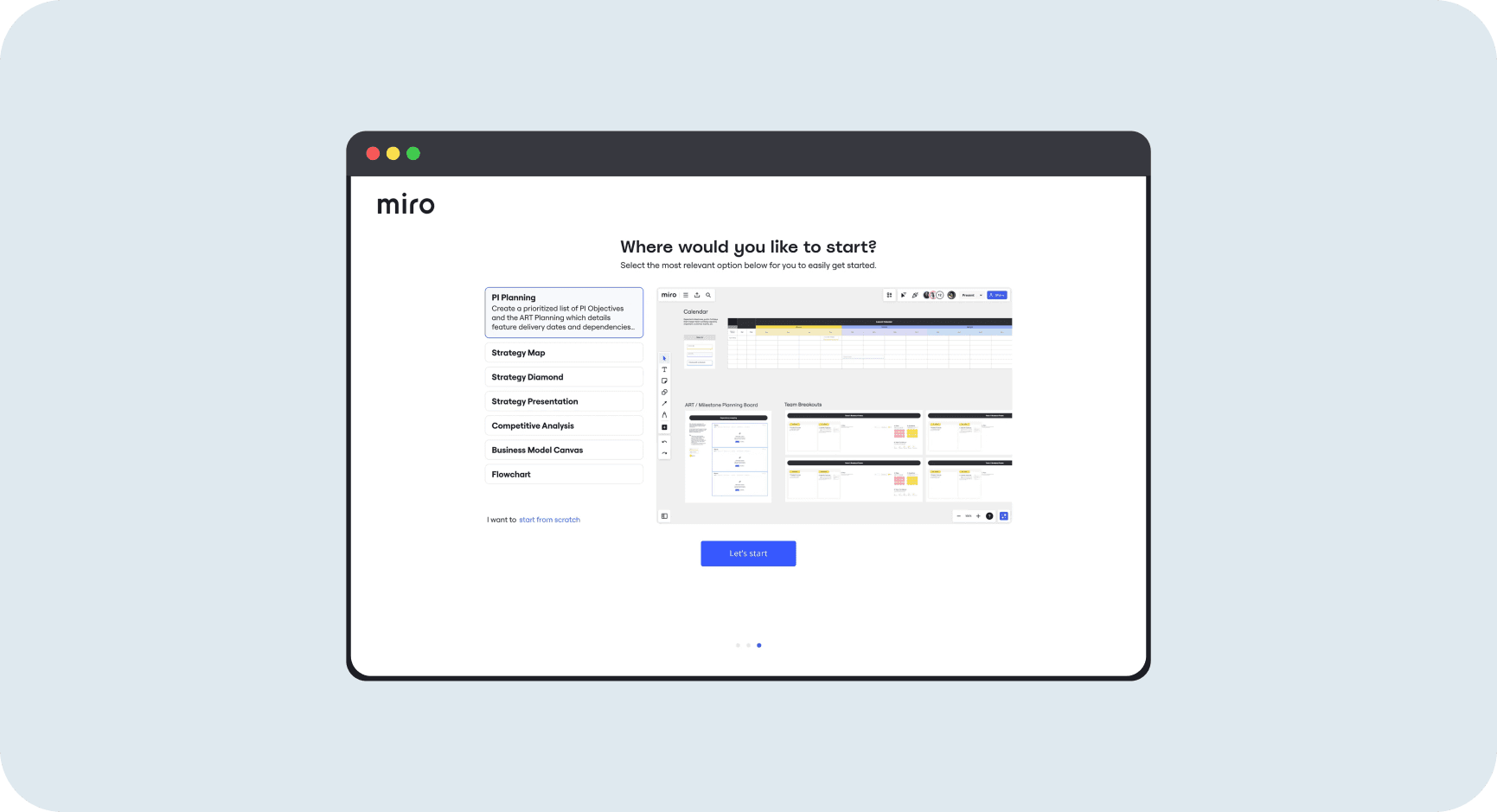
New user sees "Where would you like to start?" with template options like PI Planning, Strategy Map, Business Model Canvas. Each shows a preview of a filled-in board. Click "Let's start" and land in a workspace already populated with the template [3].
Why It Works
Users see what's possible immediately. No empty canvas forcing imagination. Templates show the "promised land" and make the next step obvious. Option to "start from scratch" exists but isn't primary [4].

What To Measure
Template selected rate vs blank start, time to first artifact creation, activation completion. For collaboration tools, track actual collaboration actions not just solo setup [5].

No Blank Slate
Pre-populate with examples so users start in the promised land

Miro

The Flow
New user sees "Where would you like to start?" with template options like PI Planning, Strategy Map, Business Model Canvas. Each shows a preview of a filled-in board. Click "Let's start" and land in a workspace already populated with the template [3].

Why It Works
Users see what's possible immediately. No empty canvas forcing imagination. Templates show the "promised land" and make the next step obvious. Option to "start from scratch" exists but isn't primary [4].

What To Measure
Template selected rate vs blank start, time to first artifact creation, activation completion. For collaboration tools, track actual collaboration actions not just solo setup [5].

No Blank Slate
Pre-populate with examples so users start in the promised land

Miro

The Flow
New user sees "Where would you like to start?" with template options like PI Planning, Strategy Map, Business Model Canvas. Each shows a preview of a filled-in board. Click "Let's start" and land in a workspace already populated with the template [3].

Why It Works
Users see what's possible immediately. No empty canvas forcing imagination. Templates show the "promised land" and make the next step obvious. Option to "start from scratch" exists but isn't primary [4].

What To Measure
Template selected rate vs blank start, time to first artifact creation, activation completion. For collaboration tools, track actual collaboration actions not just solo setup [5].

Personalized Setup Guide
Checklist that adapts to user's profile and integrations

Personalized Setup Guide
Checklist that adapts to user's profile and integrations

Personalized Setup Guide
Checklist that adapts to user's profile and integrations

Developer-First Quick Starts
Action cards showing what you can do right now

Developer-First Quick Starts
Action cards showing what you can do right now

Developer-First Quick Starts
Action cards showing what you can do right now

Value Proposition Focus by Product Type

Product categories map to different value proposition focuses, early success metrics, and onboarding patterns [18]:

Product Type

Primary Value Focus

Early Success Metric

Onboarding Pattern

Collaboration SaaS

Team coordination

First shared action

Invite flow, team setup

Content Creation

Output quality

First artifact created

Templates, no blank slate

Developer Tools

Integration speed

First deployment

Fast to first success

E-commerce

Transaction ease

First purchase

Guest checkout prominent

Consumer Apps

Habit formation

3+ uses Week 1

Immediate value, repeat trigger

Mistakes That Kill Success

avoid this

Gating Product Before Value

Demanding email verification, profile setup, payment info before users experience anything. 27% of signups never activate an email gate [6] at the start.

Fix
Show value first, then ask for commitment. If you must gate early, explain why it helps the user, not just why you need it.

avoid this

Product Tours That Interrupt

Multi-step tours that block the interface. Users skip or close them. They want to do, not watch. Tours are for complex enterprise software, not self-serve PLG.

Fix
Use contextual hotspots (tooltips that appear when relevant) or action-driven checklists instead of forced tours.

avoid this

Too Many Choices Upfront

Showing all features, all options, all paths at once. Shot glass-sized brains can't handle it [1]. Decision paralysis leads to abandonment.

Fix
One obvious path forward. Expand options only after first success. Earn the right to show complexity.

Metrics That Matter

Signup Completion Rate
Percentage who start signup and complete it. Measures form friction. Each field adds drop-off [8].

Signup Completion Rate
Percentage who start signup and complete it. Measures form friction. Each field adds drop-off [8].

Signup Completion Rate
Percentage who start signup and complete it. Measures form friction. Each field adds drop-off [8].

Time to First Value
How long from signup complete to first meaningful action. Faster is always better.

Time to First Value
How long from signup complete to first meaningful action. Faster is always better.

Time to First Value
How long from signup complete to first meaningful action. Faster is always better.

Checklist Completion Rate
Percentage who complete onboarding checklist. Shows if your flow is clear and motivating.

Checklist Completion Rate
Percentage who complete onboarding checklist. Shows if your flow is clear and motivating.

Checklist Completion Rate
Percentage who complete onboarding checklist. Shows if your flow is clear and motivating.

The Business Impact

50%

Conversion rate improvement from segment-specific onboarding flows [9]. Custom signup flows unlock previously "low quality" channels.

Higher Activation Rates
Removing blank slate and adding progressive profiling increases flow completion by 20-30%. Small UX tweaks compound through entire funnel.t.

Faster Time to Value
Pre-populated examples and action checklists cut time to first value from hours to minutes. Users who hit value fast stay longer.

Better Activation Rates
Onboarding overhauls associated with 20% activation lifts [10]. Getting users to aha moment increases retention dramatically.

Lower Support Burden
Clear flows with contextual help reduce "how do I..." support tickets by 40%. Users self-serve successfully instead of getting stuck.

Resources Worth Your Time

Flow & UX Patterns

Deep Dive

Self-Serve Onboarding

OpenView on blank slate elimination and value-centric microcopy

Teardowns

Growth.Design Cases

Visual teardowns of onboarding flows from top products

UX Patterns

GoodUI Patterns

Experiment-driven UI patterns for signup flows and clarity

Collection

Built for Mars

UX teardowns focused specifically on onboarding experiences [13]

Deep Dive

Self-Serve Onboarding

OpenView on blank slate elimination and value-centric microcopy

UX Patterns

GoodUI Patterns

Experiment-driven UI patterns for signup flows and clarity

Teardowns

Growth.Design Cases

Visual teardowns of onboarding flows from top products

Collection

Built for Mars

UX teardowns focused specifically on onboarding experiences [13]

Deep Dive

Self-Serve Onboarding

OpenView on blank slate elimination and value-centric microcopy

UX Patterns

GoodUI Patterns

Experiment-driven UI patterns for signup flows and clarity

Teardowns

Growth.Design Cases

Visual teardowns of onboarding flows from top products

Collection

Built for Mars

UX teardowns focused specifically on onboarding experiences [13]

Strategy & Frameworks

Research

Shot Glass-Sized Brains

Casey Winters on cognitive load reality for new users [1]

Case Study

Segment-Specific Flows

Casey Winters on 50% conversion lift from custom flows [9]

Strategy

User Onboarding Best Practices

ProductLed on outcome-driven patterns and gating pitfalls [6]

Examples

Miro's Evolution

How Miro eliminated blank slate with OpenView analysis [3]

Research

Shot Glass-Sized Brains

Casey Winters on cognitive load reality for new users [1]

Strategy

User Onboarding Best Practices

ProductLed on outcome-driven patterns and gating pitfalls [6]

Case Study

Segment-Specific Flows

Casey Winters on 50% conversion lift from custom flows [9]

Examples

Miro's Evolution

How Miro eliminated blank slate with OpenView analysis [3]

Research

Shot Glass-Sized Brains

Casey Winters on cognitive load reality for new users [1]

Strategy

User Onboarding Best Practices

ProductLed on outcome-driven patterns and gating pitfalls [6]

Case Study

Segment-Specific Flows

Casey Winters on 50% conversion lift from custom flows [9]

Examples

Miro's Evolution

How Miro eliminated blank slate with OpenView analysis [3]

Keep the insights coming

Keep the insights coming

Weekly product decisions, real examples, and proven patterns from products that actually work.

Weekly product decisions, real examples, and proven patterns from products that actually work.

Weekly product decisions, real examples, and proven patterns from products that actually work.