/
Onboarding & Activation
Most products treat the first empty screen as leftover UI. The ones that grow fastest treat it as the most important screen they own: the moment that decides whether a new user activates or ghosts.
what would you do?
You've got a clean empty screen that says "Your projects will appear here." Signups are solid. Activation is stuck at 19%. What's the real problem?
Nothing looks broken. But users keep dropping off. Pick the root cause:
A
The font is too small. Users aren't even reading it.
B
It tells users what the space is for, but not what to do next, or why doing it now is worth their time.
C
It needs a friendlier illustration or a mascot to feel more inviting.
D
Users need a longer product tour before they're ready to do anything.
The Problem
The first empty screen is where most products burn their best chance. Casey Winters puts it plainly: growth problems usually aren't about too few signups. They're about users who show up, see nothing useful, and never come back. [1] Elena Verna makes the same point from the other direction: activation isn't completing setup. It's the moment a user builds a habit around your core value. Setup is just the starting line. [2]
That's what makes blank states so expensive. A cold, unguided screen isn't neutral. It's a missed opportunity to show someone what to do next, right when they're most open to direction. GoodUI calls zero-data states one of the best chances to get users over the initial learning curve. [3] NNGroup found that well-designed empty states increase learnability and surface direct pathways to key tasks, while empty containers create confusion and erode confidence. [4]
It gets worse when teams mistake onboarding for education. Reforge is blunt about this: less watching, more doing. Simple, fluid, action-first. [5] ProductLed echoes it: empty states should lead to a quick win, not a comprehensive feature tour nobody asked for. [6]
Baymard Institute studied this in a different context (no-results search pages), but the lesson carries. When users hit a dead end with no recovery path, they leave. Almost half of benchmarked sites couldn't provide an effective way forward. Apply that to onboarding: a screen with nothing to do next isn't a placeholder. It's a hole in your activation funnel. [7]
The Solution
The best empty states do one thing: turn zero-data into forward motion. OpenView frames them as in-product marketing: a chance to show what the feature is, why it matters, and what to do right now. [8] The rest of the research stacks up the same way: fewer steps, contextual guidance, and get users to their first meaningful outcome before they start wondering if signing up was worth it. [9]
The 3-Second Clarity Test
Show your empty state to a first-time user for three seconds. They should be able to answer all four without thinking. If any one is missing, the screen isn't pulling its weight:
1) What is this area for?
2) Why is it empty right now?
3) What should I do next?
4) What value will that action unlock for me?
The patterns that actually work share four ingredients: one obvious CTA, a template or demo that shows what "done" looks like, help that appears in context rather than in a separate tab, and a signal that tells users they've made progress. That combination is what moves people from confusion to momentum. [10]
Real Examples
Naming the Space and Providing One Clear Next Step
Tell users exactly what the empty space is for and give them a single action to fill it
Remote
The design decision
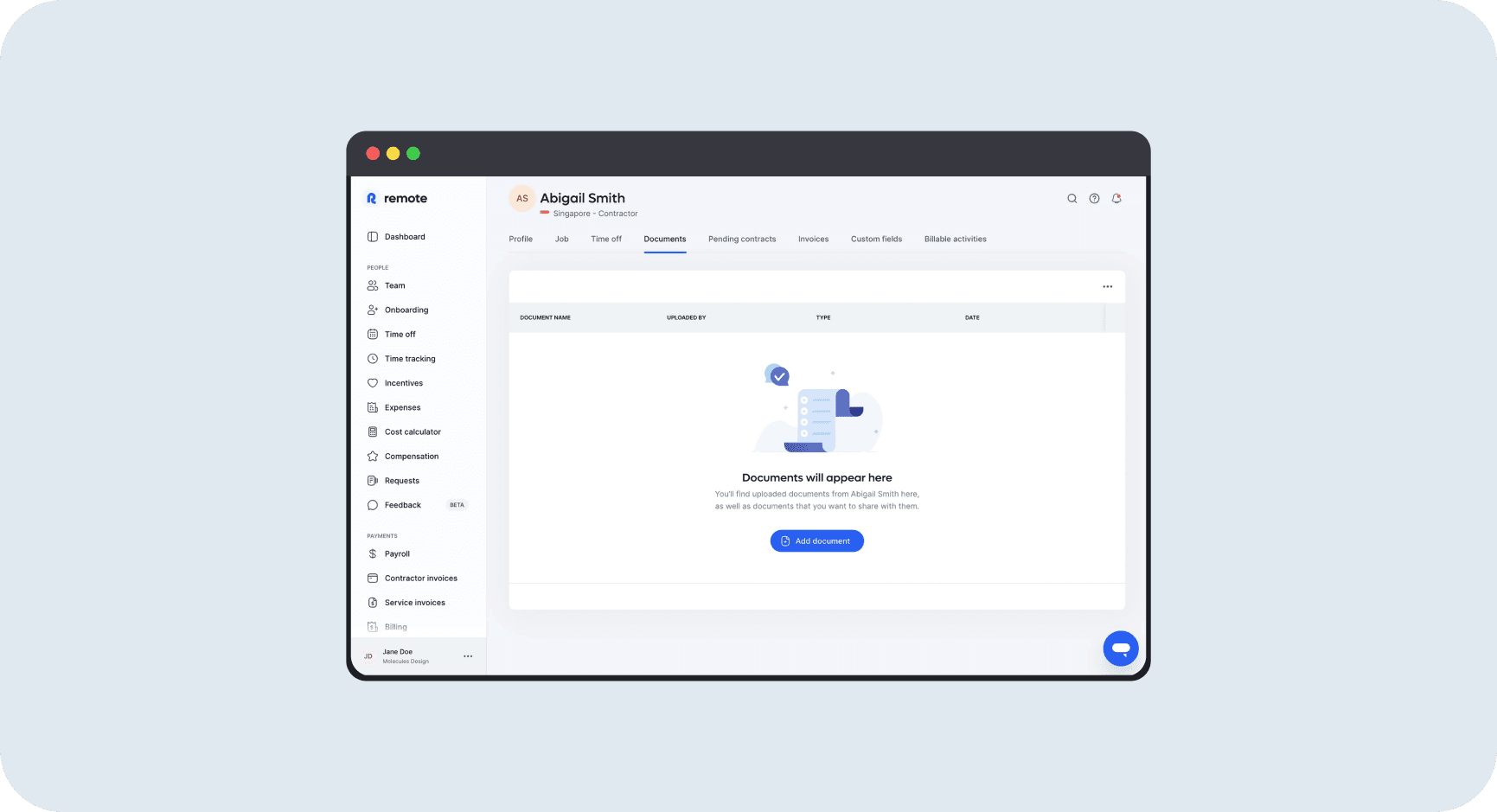
Remote's Documents tab for a new contractor shows a table structure with column headers already in place (Document Name, Uploaded By, Type, Date), then a centered illustration and two lines of copy: "Documents will appear here" and "You'll find uploaded documents from Abigail Smith here, as well as documents that you want to share with them." One blue CTA: "Add document." The empty state explains the space, sets expectations about what it will contain, and offers exactly one action to get started.
Why it works
Three things work together here. The table headers establish context before anything exists. The copy is specific to this contractor by name, making it feel intentional rather than generic. And "Add document" is the only thing to do, so there's no decision to make. NNGroup's guidance is precise: the state should provide a direct pathway for the key task. This does exactly that, with no detours. [4]
How to measure
Track document upload rate from the empty state and time from account creation to first document added. Compare activation and D7 retention between users who upload in session one versus those who don't. Session-one uploads should predict meaningfully better downstream retention. [12]
Showing Popular Starting Points to Reduce the Blank Page Problem
When users don't know where to start, show them what others have tried and let that become their first move
Offering a Real Start and a Sample State Side by Side
Let users choose between jumping in with real data or exploring with sample data so neither path feels risky
Empty State Patterns by Product Type
There's no universal empty state. What you show depends on how your product creates value and what users need to do before they get there. These seven patterns cover most situations. [18]
Pattern | What it promises | Best for | Example framing |
|---|---|---|---|
Direct next-best action | Do this first and you will unlock the product | Products with a single required first step | "Connect your data source to start seeing reports" |
Template accelerator | Start from structure, not from zero | Workspaces, boards, docs, campaign builders | "Use a proven template for your first storyboard" |
Demo-state preview | Here is what success looks like | Complex or high-anxiety products | "Explore a sample dashboard before adding your data" |
Integration unlock | One action opens the real workflow | Ecosystem-dependent SaaS | "Connect Slack to launch notifications" |
Inspiration gallery | Here are popular ways teams use this | Flexible horizontal platforms | "Start with a popular recipe used by ops teams" |
Progress cue | You are partway there, keep going | Multi-step setup flows | "Finish step two to publish your first board" |
Recovery path | You are not stuck, here are sensible alternatives | Search, filters, edge cases, partial setup | "No results yet. Try a broader filter or upload a file." |
Mistakes That Kill Success
avoid this
The Dead-End Blank State
No explanation. No sample. No way forward. Users land, see nothing useful, and have to invent a strategy from scratch. That's exactly when most give up. Baymard found nearly half of benchmarked sites failed to offer effective recovery paths on no-results pages. First-run screens have the same problem: if there's nothing to do next, users don't come back. [7]
Fix
At minimum: one line explaining why it's empty, one CTA that starts the first real action, and ideally a sample or template that shows what success looks like.
avoid this
Teaching Too Much Too Early
Long tours, stacked coach marks, feature-dump overlays: they all pile information on someone who has no context to absorb it yet. Reforge, Shopify, and NNGroup all land on the same conclusion: contextual, in-flow learning beats front-loaded explanation. Users don't need to understand your product before they take an action. They need to take an action to start understanding your product. [5]
Fix
Strip it down: one headline, one line of context, one CTA. Introduce features as users encounter them. Not up front in a tour nobody asked for.
avoid this
Optimizing for Setup Completion Instead of Value Delivery
Elena Verna makes this point sharply: teams routinely confuse setup completion with activation. The result is empty states that celebrate finishing a checklist without connecting it to anything the user actually cares about. A progress bar hitting 100% feels like a win. But if the user hasn't experienced the core value yet, it isn't. [2]
Fix
Define activation as a behavior that predicts retention, not a checklist item. Point the CTA at that milestone, not at profile completion or account settings.
Metrics That Matter
Interaction Metrics
Is the screen clear enough to prompt action? Low click-through on a high-exposure empty state is a direct signal that the copy, design, or placement isn't working. [20]
Core Formulas
Empty-state exposure rate = new users who see the state / total new users
Primary CTA click-through = CTA clicks / empty-state impressions
Template adoption rate = users who start from template / users who see template option
Activation Metrics
Did the click lead anywhere worth going? Lenny's guidance: tie activation to a behavior that predicts retention, not just sign-up or login. [21]
Downstream Business Metrics
Did the improvement actually move the business? Connect empty-state work to trial-to-paid lift and account-level activation, especially for B2B, where one user clicking through doesn't mean the account is activated. [22]
The Strategic Opportunity
+25%
ARR growth after redesigning the post-signup journey with demo data and guided next steps, with 45% activation rates for the majority of self-serve cohorts [16]
Make: +3–5% Activation
Showing popular app and template combinations in the empty state lifted activation 3–5%. Small percentage, meaningful compounding, especially when activation predicts retention. [15]
Superhuman: 2x Activation
Human-led onboarding produced nearly 2x activation over self-serve. Then self-serve went from 40% to 50% after making onboarding more opinionated and hands-on: a 25% relative improvement without adding headcount. [23]
Lenny's 2x Retention Rule
Hit the right activation milestone and users retain at 2x the rate. Which means small improvements to your empty state can have outsized downstream effects, if they push more users past the actual first-value moment. [12]
Baymard: Dead Ends Drive Abandonment
Nearly half of benchmarked sites couldn't give users a path forward when search returned nothing. The same dead-end pattern shows up in first-run screens. No next step isn't neutral. It's a direct cause of abandonment. [7]
Resources Worth Your Time