/
Core Usage & Interaction
The view users land on shapes what they do, what they ignore, and whether they stick around long enough to get value. Choosing it well is one of the highest-leverage decisions in your product.
what would you do?
You're building a project management tool. Users can manage tasks, track status, and assign work. Your team defaults to a Kanban board as the opening view because it looks impressive and shows the product's power. Activation is mediocre. What's likely wrong?
The board looks great in demos. So why isn't it working?
A
The board columns need better labels to be more intuitive.
B
Kanban boards are always a poor default and should never be used as the opening view.
C
Users need a tutorial overlay explaining how to drag cards before they can use the board.
D
The default was chosen for what looked impressive, not for what new users actually need to do first.
The Problem
A default view does three things at once: it explains the product's information architecture, sets the user's first decision path, and determines how much work the interface asks the user to do before value becomes visible. Because most users accept defaults rather than reconfigure them, a poor default isn't just suboptimal. It's a hidden form of friction.
A large meta-analysis of default effects found that preselected options materially change what users choose. That means the first view users see will shape what they do, what they ignore, and whether they stay oriented long enough to get value. The default is not neutral. it is a product decision with measurable downstream effects on activation and retention. [1]
The problem gets worse when teams treat the default view in isolation. Gmail's inbox types mix view structure with prioritization logic. Airbnb's results are shaped by search criteria, relevance, and map context. Spotify's library exposes ordering and filtering as a core part of how the collection is understood. In each case, the default is not just a layout. it's a full system of sorting, filtering, density, and responsive behavior. [2]
Material Design, Apple HIG, and Microsoft Fluent all converge on the same principle: choose layouts based on task and available window space, not on a fixed assumption about device type. There is no universally "best" default. There is only a default that is best for a particular task, maturity of data, and viewport. [3]
The Solution
Default to the user's first job, not the data model. Then tune the sort and filter preset, density, and responsive behavior around that job. The question to ask before shipping any default: if a first-time user opens this view right now, what is the clearest thing they can do next? [4]
How to Pick the Right Default View
Start by identifying the dominant organizing dimension of the user's first job:
Find, scan, compare, or act on named items? Default to list or list-detail.
Browse by image, shape, or visual card? Default to grid.
Move work through stages? Default to board only if a status model already exists.
Monitor a system or pipeline at a glance? Default to dashboard, only for returning expert users.
Focus on one record, booking, or document? Default to detail-first.
Plan or schedule by date or duration? Default to calendar or timeline.
Sorting and filtering are part of the default, not optional extras. A list without a sensible initial sort order is not a complete default. Baymard recommends a diversity-based relevance sort for broad browse contexts. Gmail makes the inbox type itself part of the default configuration. The starting state of filters and sort matters as much as the layout. [5]
Ship a moderate density by default. Fluent's layout guidance is explicit: white space creates hierarchy, reduces overwhelm, and supports scanning. Dense information is sometimes necessary but rarely the right first impression. On touch devices, minimum tap targets of 44x44px (iOS/web) and 48x48px (Android) apply regardless of how dense the content is. [6]
Adapt by window size, not device brand. Material's window size classes, Apple's adaptive layout principles, and Fluent's breakpoint system all recommend reacting to available space. The strongest default often shifts from one pane on compact widths to list-detail or multi-pane on medium and expanded widths. [7]
Real Examples
Baking Prioritization Logic into the Default Layout
The default view isn't just a layout. it also determines what kind of content gets seen first and what gets deprioritized

Gmail
The design decision
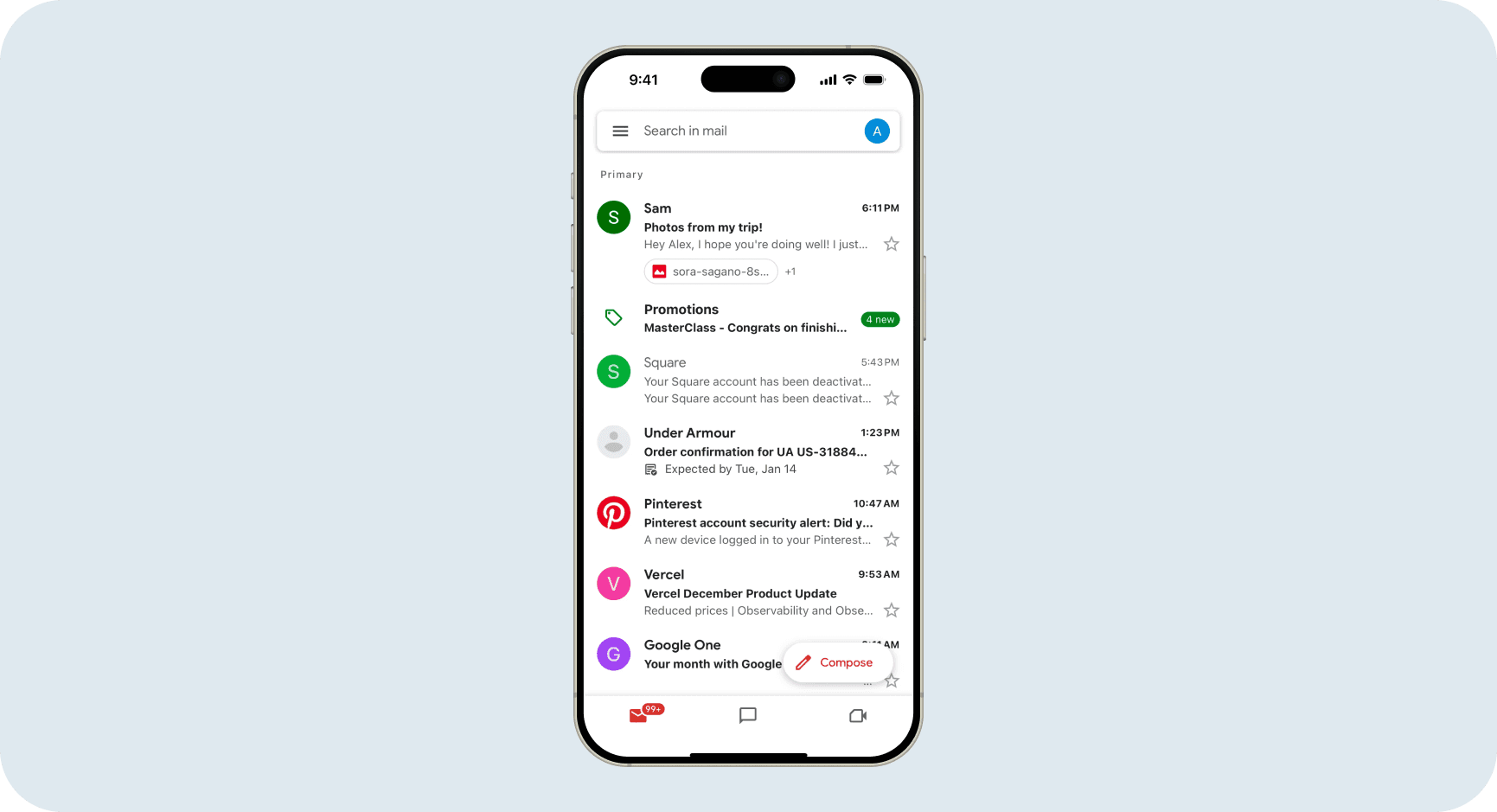
Gmail's default "Tabbed" inbox doesn't just show emails in a list. it separates them into Primary, Social, Promotions, and Updates tabs. The layout is a flat vertical list, but the default state already makes decisions about what belongs above the fold: personal messages and direct emails are prioritized, marketing and notifications are moved out of the critical path. The sort order (recency within each tab), the density (comfortable, not dense), and the tab structure are all part of what "default" means here.
Why it works
The mobile screenshot makes the design decision visible clearly. Personal messages from real people appear full-width at the top. The Promotions group is present but visually demoted: you can see it's there, but it doesn't compete with the primary content. This is prioritization baked into the layout: you never have to manually filter newsletters out of your reading flow. Gmail doesn't ask you to configure this. It's the default because it matches how most users think about their inbox: personal first, everything else secondary. [2]
Defaulting to Grid When the First Question Is Visual
When users are asking "which option looks promising?" rather than "which row has the field I need?", a grid earns its place as the default
Using Board View Only When a Status Model Already Exists
A board earns its place as the default only when stage progression is the dominant task. not when the backlog is unstructured or huge
View Types at a Glance
The right view depends on the user's dominant organizing dimension. This table synthesizes guidance from Material, Apple HIG, Fluent, and official product documentation across Notion, Airtable, Trello, Google Calendar, and Spotify. [3]
View Type | Default when... | Avoid as default when... | Default sort |
|---|---|---|---|
List | Users need to find, scan, or act on named items. inboxes, task queues, document libraries | Users are browsing visually or comparing images | Recency for streams; status + due date for task lists |
Grid | The first question is visual. home rentals, image portfolios, product catalogs | Content is text-heavy or requires sequential comparison | Relevance (not price or A-Z) for broad browse |
Board | A status model already exists and users primarily move work between stages | The backlog is large and unstructured, or the product is new with no existing workflow | Due date or priority within each lane |
Dashboard | Returning expert users need situational awareness across multiple metrics | First-run experiences or no-data states | Current period, exception-first |
Detail-first | One record, booking, profile, or document deserves focused attention | Users need to compare multiple items or navigate a collection | Most recent or next due |
Calendar / Timeline | Date or duration is the primary organizing dimension. editorial, staffing, scheduling | Date is a secondary property and status or ownership usually matters first | Nearest upcoming items; hide completed by default |
Mistakes That Kill Success
avoid this
Choosing the Default for What Looks Impressive, Not What Users Do First
Dashboards and boards look great in demos. They signal sophistication. But a dashboard is only valuable when data already exists, and a board requires users to have a status model they understand. For new users with no data and no established workflow, both of these views create confusion rather than clarity. The default should be chosen by asking "what is the clearest first action here?". Not "what communicates the product's power?" [4]
Fix
Map the user's first job. If the dominant first action is scanning a list of items and opening one, default to list or list-detail. Promote dashboard and board to views users can discover once they have data and context to make them useful.
avoid this
Using Dashboard as the Default for Empty or First-Run Experiences
Research on dashboard cognitive load shows that layout choices directly affect what people notice and what they miss. An empty dashboard communicates nothing useful and asks users to interpret a blank surface they don't yet understand. This is especially damaging for first-time users, who need direction, not a monitoring interface for a system they haven't built yet. [12]
Fix
For first-run experiences, default to a list, a setup flow, or a direct-action empty state that points toward data creation. Reserve the dashboard as the default only after the user has enough data for it to be meaningful.
avoid this
Using Grid as the Default for Text-Heavy or Comparison-Heavy Work
Grids gain visual breadth but lose reading order. Research on search-result interfaces found that list layouts produce more linear, homogenous viewing behavior, which is better for sequential comparison and text-first scanning. If the dominant task is reading, comparing, or acting on items with meaningful text fields, grid pushes the most useful information off-screen and forces users to open each card to see what they need. [13]
Fix
Use grid only when the first question is visual ("which one looks right?"). For admin surfaces, inboxes, task queues, and document libraries, list is the resilient default even when the content could technically be displayed as cards.
Metrics That Matter
View Engagement Metrics
These tell you whether the default view is matching the dominant task. The most important signal is immediate view-switching. If users change the view within the first few seconds, the default wasn't right for them. [16]
Core Formulas
Immediate view-switch rate = users who switch view within first session / users who see the default view
Time to first item open = timestamp(first item click) - timestamp(view impression)
Filter application rate = sessions with at least one filter applied / total sessions on the view
Benchmark Guidance
If more than 30% of users immediately switch away from the default view in the first session, the layout is not matching the dominant task. If users frequently search rather than scan, the default sort or density may not be surfacing the right content.
Activation and Downstream Metrics
View choice affects not just first-session behavior but activation and retention. A default that gets users to their first meaningful action faster shows up in activation rate and D7 retention. [16]
The Opportunity
~30%
The threshold at which immediate view-switch rate signals the default is wrong for the dominant task. If more than 30% of users change views on first load, the default is costing you activation before the user has done anything. [3]
Defaults Are Sticky
A large meta-analysis found that preselected options materially change what users choose. The default view is not a starting point users will naturally reconfigure. Most will work within it whether or not it serves them well. [1]
Sort Order Changes Behavior
Baymard recommends relevance over price or A-Z as the default sort for broad browse surfaces. The wrong default sort buries high-quality results, drives filter usage up, and increases bounce before users find what they need. [5]
Grid Beats List for Visual Tasks
A 2018 study found grids produce faster reaction times and higher perceived aesthetics for visual e-commerce tasks. But list layouts produce more linear viewing behavior for text-first or comparison tasks. Task type determines which wins. [13]
Responsive Layout Shapes Activation
Material, Apple, and Fluent all recommend adapting layout to available window space rather than device type. The default view on compact widths is often a different layout than on expanded widths. And getting that transition right directly affects whether mobile users can reach first value. [7]
Resources Worth Your Time