/
Error States & Recovery
Recovery guidance is not just an error message. It is the combination of diagnosis, corrective suggestion, preserved progress, visible affordances, and escalation paths that let users continue after something goes wrong, without confusion and without starting over.
what would you do?
Your checkout form shows "Invalid input" on submit. Users are abandoning at this step. A designer wants to make the error text red and bold. What should you do instead?
Pick the highest-impact fix:
A
Make the error message red, bold, and larger so users notice it faster.
B
Add inline validation so the error appears while the user is typing.
C
Replace the generic message with a specific one that names the subissue and says exactly what to fix.
D
Move the error message to the top of the page so users see it immediately.
The Problem
Recovery guidance fails most often in one of two ways: it names the failure without naming the fix, or it names the fix but has already lost the user's work. Baymard found that 98% of benchmarked sites still rely on generic validation messages, and that vague wording can make users misdiagnose the problem, try to fix the wrong field, or abandon entirely. The same research found that 31% of sites had no inline validation at all, forcing users to stop, search, remember, and re-orient after a failed submit. [1]
The business impact extends well beyond forms. Growth.Design's "Sniper Link" case study reframed a common onboarding dead end ("check your inbox") into a provider-aware recovery flow that opens the likely mailbox directly. That single change produced a 7% relative lift in email confirmation rates, a 94% confirmation rate overall, and confirmations that were 10% faster. Better early guidance compounds further downstream: ProductLed cites examples where improved week-one onboarding lifted week-one retention 15% and week-10 retention 50%, with users who completed onboarding being nearly three times more likely to be retained by week 12. [2]
In monetization-critical flows the stakes are even clearer. Baymard reports that offering a genuine alternate payment route inside a "card declined" recovery flow recouped around 30% of otherwise lost decline abandonments. ChartMogul notes that failed payments account for roughly 40% of SaaS churn, which means billing recovery is not a support nicety but a retention system. [3]
The Solution
The Five Questions Every Recovery State Must Answer
The best recovery flows answer five questions immediately for the user. When all five are present, error states feel like small detours. When any are absent, they become abandonment events.[4]
The five questions: how to answer them
1. What failed? Name the specific subissue, not just the field or action. "Your card number is too short" not "Invalid card number."
2. Where did it fail? Place the error close to the source. Inline beside the field, not only in a page-level banner the user has to scroll to find.
3. What do I do next? State the corrective action explicitly. "Enter the remaining digits" not "Check your input."
4. What happened to my work? If the user's input was preserved, say so. "Your billing details are still saved." If it was not, say that too and explain why.
5. What if this does not work? Offer a fallback: resend, try a different method, contact support, or use an alternate service. Never leave a dead end with no escape route.
A practical copy formula that answers all five is: problem then fix then state of saved work then fallback. For example: "Your card number is incomplete. Enter the remaining digits to continue. Your billing details are still saved. Or choose PayPal instead." That structure reflects Baymard's adaptive-message logic, GOV.UK's saved-work guidance, and NN/g's recommendation to offer constructive advice without blame. [1]
Real Examples
Naming the Subissue Instead of the Field
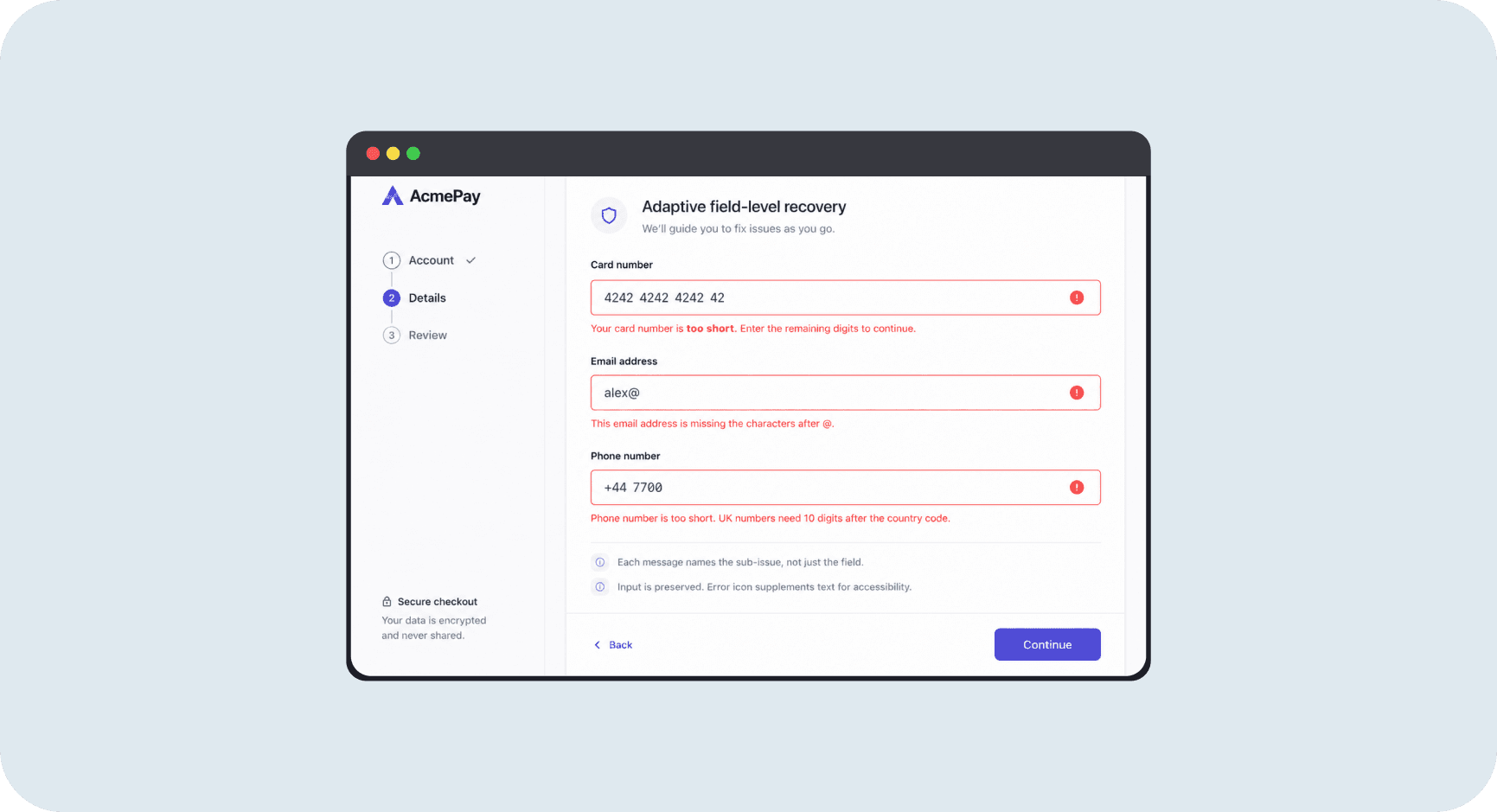
Generic "invalid input" messages shift diagnosis work onto the user. Adaptive messages name exactly what is wrong and exactly what to do about it

Field-level Recovery
The design decision
The difference between a generic message and an adaptive one is not visual weight or color: it is specificity. "Phone number is invalid" leaves users guessing: is it too short, wrong format, wrong country code? "Phone number is too short. UK numbers need 10 digits after the country code" names the subissue and the fix simultaneously. Baymard documents examples like "This email address is missing the @ character," "The state entered is not valid with the ZIP code entered," and "Card number is too short." Each message is triggered by a specific rule violation, not by a blanket field-level failure.
Why it works
Adaptive messages work because they eliminate the diagnosis step. When users know exactly what is wrong and exactly how to fix it, they correct the input and continue rather than abandoning. Baymard observed users spending up to five minutes on simple issues with vague messages, purely because they could not tell what the product was asking them to fix. The error icon beside the field supplements the text without replacing it, supporting users who rely on screen readers or who have low vision. Color alone is never sufficient for error identification under WCAG 1.4.1. [1]
Validating at the Right Moment, Not Too Early and Not Too Late
Inline validation after field completion gives users contextual correction while the input is still fresh, without making them feel scolded before they have finished typing
Offering an Alternate Route When the Primary Path Fails
Card decline recovery with a visible alternate payment method recovers around 30% of otherwise lost transactions, turning a potential abandonment into a completed purchase
Recovery Patterns and When to Use Each
Recovery guidance is not one pattern. It is a layered system. The right layer depends on the failure type, severity, and how much user work is at stake. [6]
Pattern | Best use cases | What the user sees | Main failure if omitted |
|---|---|---|---|
Adaptive field-level message | Required fields, format errors, range violations, incompatible values | Exact subissue named plus exact corrective action | Guesswork, repeated retries, abandonment |
Inline validation after completion | Predictable high-frequency inputs: email, phone, password, card number | Immediate contextual correction or positive confirmation | Submit-time surprise and full-page re-orientation |
Warning instead of blocking | Suspicious but non-fatal inputs, optional enrichment, soft quality checks | Caution copy that still allows the user to continue | Unnecessary hard stops that frustrate users with valid edge-case inputs |
Error summary with field links | Long, multi-step, or dense forms with multiple simultaneous errors | Page-top summary with focus management and deep links to each field | Hidden errors, keyboard-access problems, screen-reader misses |
Preserve input, autosave, undo | Long tasks, sensitive forms, creation flows, destructive actions | User work stays intact; reversible actions where possible | Rage, restart, abandonment |
Alternate path CTA | Payment decline, verification pending, auth mismatch, service outage | Retry plus resend, alternate method, or change email | Support-only dead ends and preventable abandonment |
Support escalation with context | Regulated, high-stakes, or system-caused failures | Help center, chat, or callback with pre-filled context | User exits the product entirely to seek help elsewhere |
Mistakes That Kill Success
avoid this
Generic Messages That Name the Failure but Not the Fix
"Invalid input," "processing failed," and "something went wrong" identify that something is wrong without helping the user understand what or how to correct it. Baymard and NN/g both show this shifts diagnosis work onto the user and can turn a simple correction into abandonment. Baymard observed users spending up to five minutes on straightforward issues purely because the wording gave no specific direction. [1]
Fix
Replace generic messages with adaptive ones that name the specific subissue and the corrective action. Rank error states by frequency times abandonment risk times support cost and rewrite the highest-impact ones first. Even a small set of specific messages for the most common errors will produce a measurable recovery rate improvement.
avoid this
Wiping User Work on Error
Clearing fields after a validation error, forcing full page reloads, or making users restart multi-step flows is one of the clearest causes of form abandonment. Baymard's research on preserved card data is particularly strong: users who have to re-enter card details after a decline error abandon at significantly higher rates than those whose details are preserved and pre-filled. GOV.UK's pattern guidance to re-show pages with existing answers reflects the same principle for general validation flows. [7]
Fix
Preserve all non-sensitive input after errors. For sensitive fields like card numbers, preserve the data in memory even if the display clears for security, and pre-fill it on the retry screen. For long or multi-step flows, autosave progress so users can return to the last saved point rather than restarting from step one.
avoid this
Validating Too Early
Triggering validation while the user is still typing produces premature errors that feel accusatory. A user who types "ale" in an email field and immediately sees "Invalid email address" is being scolded for an input they were in the process of completing correctly. NN/g explicitly warns against hostile error patterns, and Baymard's inline validation research identifies premature triggering as one of the most common implementation mistakes. [8]
Fix
Trigger validation after field completion or blur for most inputs. The exception is progressive feedback for fields where partial completion is informative and welcomed: password strength indicators and character counters are the clearest examples. Test your trigger timing with real users before shipping: premature errors are easy to miss in demos but obvious in use.
Metrics That Matter
Immediate Recovery Metrics
Instrumenting only "error count" is rarely enough. Teams need to know whether the error was recoverable and whether the user actually recovered. [10]
Core Formulas
Recovery completion rate = users who complete the task after seeing an error / users who saw the error
Time to recovery = timestamp(successful completion) - timestamp(first error shown)
Abandonment after error = users who leave after seeing an error / users who saw the error
Resubmissions per session = total form submissions per user / completing users
Downstream Business Metrics
Recovery guidance that works in the moment compounds into activation, retention, and revenue. These metrics confirm whether improvements to recovery states are producing durable business value. [11]
The Opportunity
30%
The proportion of card decline abandonments recovered by offering a genuine alternate payment route in the decline recovery flow, roughly equivalent to a 1% lift in total completed sales [3].
98% of Sites Still Use Generic Messages
Baymard found that 98% of benchmarked sites still rely on generic validation messages. Users observed in testing spent up to five minutes on simple issues because the wording gave no specific direction. Adaptive microcopy is the single highest-impact recovery improvement for most products. [1]
7% Lift from Action-First Verification
Growth.Design's Sniper Link experiment (replacing "check your inbox" with a provider-aware mailbox button) produced a 7% relative lift in confirmation rates, 94% overall confirmation rate, and 10% faster confirmations. Recovery guidance should be action-first, not explanation-first. [2]
Failed Payments Are 40% of SaaS Churn
ChartMogul notes that failed payments account for roughly 40% of SaaS churn. Billing recovery is not a support nicety. It is a direct retention lever. A decline recovery flow with an alternate payment option is as important as the primary payment flow itself. [11]
3x Week-12 Retention from Better Onboarding
ProductLed cites InnerTrends findings that users who completed onboarding were nearly three times more likely to be retained by week 12. Recovery guidance during onboarding (clear verification flows, adaptive setup errors, preserved progress) is part of what determines whether users complete it. [12]
Resources Worth Your Time