/
Error States & Recovery
Turn "something went wrong" moments into trust-building moments. Pair empathetic tone with fast, observable recovery paths to keep users moving toward completion.
what would you do?
User enters incomplete card number. Your error says "Invalid card number." They abandon checkout. What's wrong?
The error appeared, the user saw it, but they still left. Choose the root cause:
A
Should validate on submit, not inline.
B
Error is too generic. Doesn't tell them what's incomplete or how to fix it.
C
Should clear the field so they can start fresh.
D
Red color is too aggressive and scares users away.
The Problem
Users drop out the moment they feel confused or blamed. Generic error messages convert small mistakes into hard stops. [1]
Baymard Institute reports the global average cart abandonment rate is 70.19%. Error prevention, error detection, and error recovery are material contributors to checkout conversion because errors are frequent "barriers to completion." [2]
Poor recovery design multiplies frustration by erasing effort. Clearing payment fields after a validation error forces re-entry and causes compounding errors. Preserving entered data helps users spot mistakes and correct only what's wrong. [3]
The Solution
Design error moments as a system: classification, tone, placement, recovery action, and measurement. The best patterns combine three principles: show the problem early and in context, preserve the user's work, and provide a clear next action. [4]
The 3-Second Clarity Test for Error Messaging
A user should immediately understand:
1) What happened (in plain language)
2) Why it happened (specific, not generic)
3) What to do next (a single clear action or short set of choices)
4) What you preserved (did you save my work, and what happens if I retry?)
Tone rules are simple but strict: use nonjudgmental language that places accountability on the system rather than the user, and avoid humor in situations where users may be stressed or see the error repeatedly. [5]
Real Examples
Adaptive Validation with Specific Fixes
Tell users exactly what's wrong and exactly how to fix it [6]

Trello
How they do it
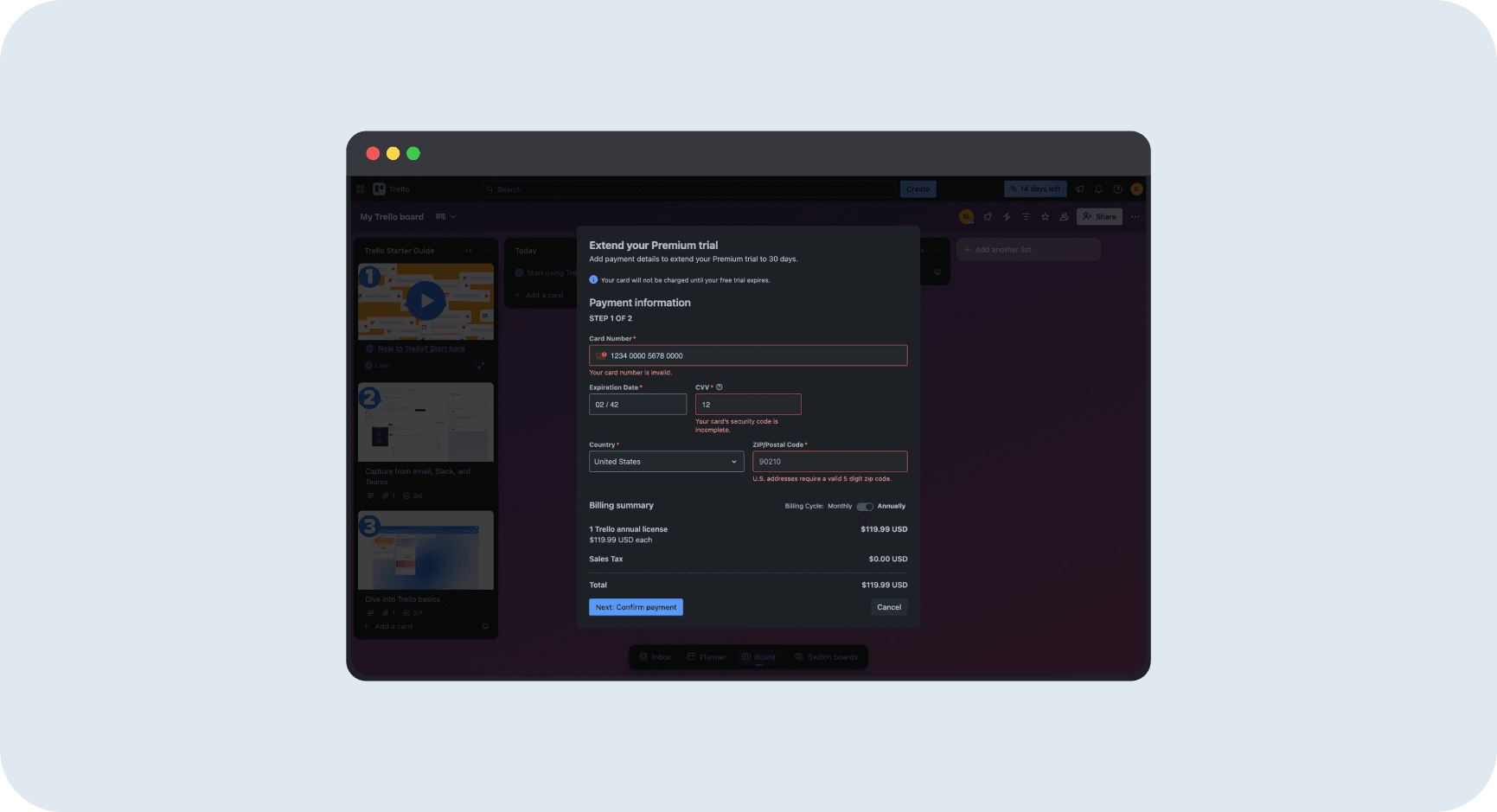
Trello's payment form shows three specific error messages simultaneously. Card number field with red border: "Your card number is invalid." CVV field showing "12": "Your card's security code is incomplete." ZIP code showing "90210": "U.S. addresses require a valid 5 digit zip code." Each error names the specific subrule that failed. Each field preserves what the user entered.
Why it works
Trello doesn't say "invalid input" and leave users guessing. Each error specifies what's wrong: incomplete, not just invalid. The CVV error doesn't say "wrong CVV," it says "incomplete," which tells the user they need more digits. The ZIP error teaches the format: "valid 5 digit." Users know exactly what to fix. No guessing. No re-entering everything. Just fix the red fields.
Error Summary Banner + Inline Errors
Show all issues at once, guide users to each fix [7]
Progressive Validation with Live Feedback
Show requirements upfront, validate as users type, celebrate success [8]
Mistakes That Kill Success
avoid this
Generic Errors with No Next Step
"System error" or "Something went wrong" without a concrete fix makes users guess, increasing abandonment. Baymard shows generic messages leave users unable to determine the cause. [9]
Fix
Replace "Invalid input" with subrule-specific text: "Your card number is incomplete. Enter the remaining 4 digits." or "We couldn't save your changes. Try again, or contact support with code #12345."
avoid this
Blaming, Shaming, or "Invalid/Illegal" Language
Nielsen Norman Group explicitly recommends a positive, nonjudgmental tone and warns against blaming phrasing. "You entered an invalid value" makes users feel stupid and increases drop-off. [10]
Fix
Change tone from user-blaming to system-accountability: "We couldn't accept that value. Try this format: MM/DD/YYYY." Place accountability on the system, not the user.
avoid this
Destroying User Effort During Failure
Clearing payment fields or losing work on a network error is a conversion killer. Forces rework and increases error loops. Baymard documents faster recovery when data is preserved. [11]
Fix
Preserve entered data and highlight only the problem field. Auto-save drafts. Show "Your work is still here" messaging on system failures.
Metrics That Matter
Recovery Rate
Percentage of users who encounter an error but still complete the task. This is the ultimate measure of whether your error UX works. [13]
Benchmark
Track by error type. Payment errors should have >60% recovery. Form validation errors >80%. System errors <50% is common but improvable.
How to Measure
Formula: Recovery Rate = (Sessions with error that complete task / Sessions with error) × 100
Track "error_shown" and "task_completed" events, segment by error type
Time to Recover
Time from error shown to successful continuation. Fast recovery means clear messaging and preserved work. Slow recovery means users are stuck, guessing, or retyping. [14]
Error Abandonment Rate
Percentage of users who see an error and abandon within X minutes. High abandonment means errors are causing drop-off, not just friction. [15]
The Opportunity
35%
Potential conversion increase from checkout UX improvements including error recovery (Baymard, large e-commerce sites) [16]
70% Cart Abandonment
Global average. Errors are frequent barriers. Every improved error recovery reduces this number. [17]
94% Use Generic Errors
Most sites don't use adaptive validation. High opportunity to differentiate with specific, helpful errors. [18]
34% Clear Fields
Still force users to re-enter card data after errors. Preserving input is a quick conversion win. [19]
10% Conversion Lift
PicPay improved conversion 10% by fixing drop-offs and bugs in registration flow (Mixpanel case study). [20]
Resources Worth Your Time